自定义文本高亮的两种实现
CSSJavaScript
String.prototype.split 实现
原理
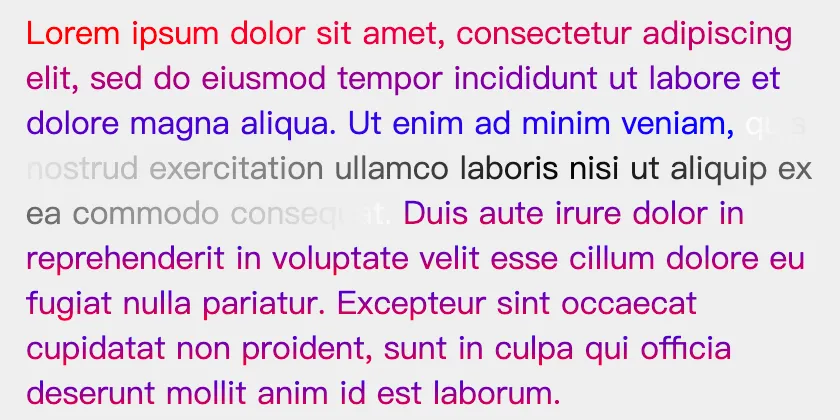
使用高亮目标将文本分割为三部分 (pre, target, post), 分别使用不同类名的span标签包裹, 通过CSS对三个部分进行样式设置.
效果
实现
<!doctype html>
<html lang="zh">
<head>
<meta charset="UTF-8">
<meta name="viewport"
content="width=device-width, user-scalable=no, initial-scale=1.0, maximum-scale=1.0, minimum-scale=1.0">
<meta http-equiv="X-UA-Compatible" content="ie=edge">
<title>Example1</title>
<style>
#el {
width: 400px;
padding: 16px;
background-color: #EFEFEF;
.pre-hl {
background-clip: text;
background-position: 0 0;
background-image: linear-gradient(90deg, red, blue);
background-repeat: no-repeat;
color: transparent;
display: inline;
}
.hl-target {
background-clip: text;
background-position: 0 0;
background-image: radial-gradient(circle, black, white);
background-repeat: no-repeat;
color: transparent;
display: inline;
}
.post-hl {
background-clip: text;
background-position: 0 0;
background-image: linear-gradient(0deg, red, blue);
background-repeat: no-repeat;
color: transparent;
display: inline;
}
}
</style>
</head>
<body>
<p id="el"></p>
<script>
const paragraph = 'Lorem ipsum dolor sit amet, consectetur adipiscing elit, sed do eiusmod tempor incididunt ut labore et dolore magna aliqua. Ut enim ad minim veniam, quis nostrud exercitation ullamco laboris nisi ut aliquip ex ea commodo consequat. Duis aute irure dolor in reprehenderit in voluptate velit esse cillum dolore eu fugiat nulla pariatur. Excepteur sint occaecat cupidatat non proident, sunt in culpa qui officia deserunt mollit anim id est laborum.'
const target = 'quis nostrud exercitation ullamco laboris nisi ut aliquip ex ea commodo consequat.'
const el = window.el
el.innerHTML = paragraph
const [pre, post] = paragraph.split(target)
el.innerHTML = `<span class="pre-hl">${pre}</span><span class="hl-target">${target}</span><span class="post-hl">${post}</span>`
</script>
</body>
</html>CSS Custom Highlight 实现
原理
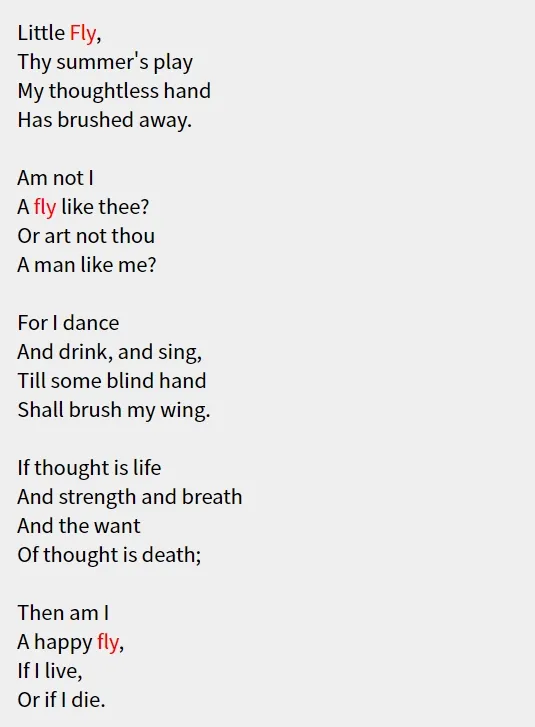
找到高亮目标在文本中的位置记录为Range对象, 使用Highlight对象将Range对象集合封装, 使用CSS.highlights.set方法将
Highlight对象绑定到指定的类名上.
效果
实现
<!doctype html>
<html lang="zh">
<head>
<meta charset="UTF-8">
<meta name="viewport"
content="width=device-width, user-scalable=no, initial-scale=1.0, maximum-scale=1.0, minimum-scale=1.0">
<meta http-equiv="X-UA-Compatible" content="ie=edge">
<title>Example2</title>
<style>
::highlight(hl-target) {
color: red;
font-weight: bold;
}
#el {
width: 400px;
padding: 16px;
background-color: #EFEFEF;
white-space: pre-wrap;
}
</style>
</head>
<body>
<p id="el"></p>
<script>
const paragraph = 'Little Fly,\n' +
'Thy summer\'s play\n' +
'My thoughtless hand\n' +
'Has brushed away.\n' +
'\n' +
'Am not I\n' +
'A fly like thee?\n' +
'Or art not thou\n' +
'A man like me?\n' +
'\n' +
'For I dance\n' +
'And drink, and sing,\n' +
'Till some blind hand\n' +
'Shall brush my wing.\n' +
'\n' +
'If thought is life\n' +
'And strength and breath\n' +
'And the want\n' +
'Of thought is death;\n' +
'\n' +
'Then am I\n' +
'A happy fly,\n' +
'If I live,\n' +
'Or if I die.'
const target = 'fly'
const el = window.el
el.innerHTML = paragraph
const textNode = el.firstChild
const ranges = []
const matcher = new RegExp(target, 'ig')
/**
* @type {RegExpExecArray | null}
*/
let pos = matcher.exec(paragraph)
while (!!pos) {
const range = new Range()
range.setStart(textNode, pos.index)
range.setEnd(textNode, pos.index + target.length)
ranges.push(range)
pos = matcher.exec(paragraph)
}
const hl = new Highlight(...ranges)
CSS.highlights.set('hl-target', hl)
</script>
</body>
</html>